Lesson 4: Agentic Development & Context Engineering
Session Duration: 45 minutes
Audience: Embedded/C++ Developers (Intermediate to Advanced)
Environment: Windows, VS Code
Extensions: GitHub Copilot
Source Control: GitHub/Bitbucket
Overview
This lesson teaches you how to become an agentic developer—someone who orchestrates AI agents to accomplish complex development tasks efficiently. Instead of writing every line of code manually, you’ll learn to direct specialized agents with rich context to produce production-quality embedded code.
What You’ll Learn:
- The agentic mindset: from “how do I code this?” to “how do I describe this?”
- Context engineering: providing AI with the right information for accurate output
- Task decomposition: breaking complex features into agent-assignable subtasks
- Iterative refinement: polishing AI output into production-ready code
Key Concepts:
- 6 Specialized Agents: ODrive Engineer, ODrive QA, ODrive Ops, ODrive Reviewer, ODrive Toolchain, Ada to C++ Migrator
- 9 Skills: Specialized capabilities agents invoke automatically (e.g.,
cpp-testing,odrive-toolchain,odrive-ops) - Context Layering: Building prompts with constitution → agent → files → constraints → acceptance criteria
Table of Contents
- Overview
- Prerequisites
- Why Agentic Development Matters
- Learning Path
- What is an Agentic Developer?
- Context Engineering Best Practices
- Decomposition Strategies
- Iterative Refinement Workflow
- Guided Example: Agentic Refactoring
- Practice Exercises
- Quick Reference
- Troubleshooting
- Additional Resources
- Frequently Asked Questions
- Summary: Key Takeaways
Prerequisites
Before starting this session, ensure you have:
- Completed Planning & Steering Documents - Understanding of custom instructions, prompt files, and custom agents
- Visual Studio Code with GitHub Copilot extensions installed and enabled
- Active Copilot subscription with access to all features
- ODrive workspace - Access to the ODrive firmware codebase
- Custom agents configured - Verify
.github/agents/folder contains agent definitions
Verify Your Setup
-
Check custom agents are available:
- Open Chat view (Ctrl+Alt+I)
- Click agents dropdown - should see all 6 agents:
- ODrive Engineer (primary development)
- ODrive QA (testing & quality)
- ODrive Ops (CI/CD & releases)
- ODrive Reviewer (code review)
- ODrive Toolchain (build & test)
- Ada to C++ Migrator (legacy migration)
- If missing, verify
src-ODrive/.github/agents/*.agent.mdfiles exist
-
Test agent selection:
- Select ODrive Engineer from dropdown
- Send a test message: “What’s your specialty?”
- Confirm specialized response mentioning firmware, motor control, or hardware
-
Verify workspace context:
- Ensure
src-ODrive/Firmware/MotorControl/folder is accessible - Check
src-ODrive/.github/copilot-instructions.mdexists - Verify skills folder:
src-ODrive/.github/skills/
- Ensure
Why Agentic Development Matters
The shift from traditional development to agentic development represents a fundamental change in how we approach complex coding tasks.
Benefits of Agentic Development
-
Accelerated Implementation
- Hours of manual coding reduced to minutes
- Focus on design and requirements, not syntax
- Parallel task execution with multiple agents
-
Domain Expertise on Demand
- Specialized agents for firmware, motor control, testing
- Consistent application of best practices
- Encoded knowledge available to entire team
-
Higher Quality Output
- Agents follow documented standards
- Built-in validation and refinement loops
- Cross-domain verification (firmware + QA)
-
Reduced Cognitive Load
- Describe intent, not implementation
- Agent handles boilerplate and patterns
- Developer focuses on architecture decisions
Agentic Development Flow
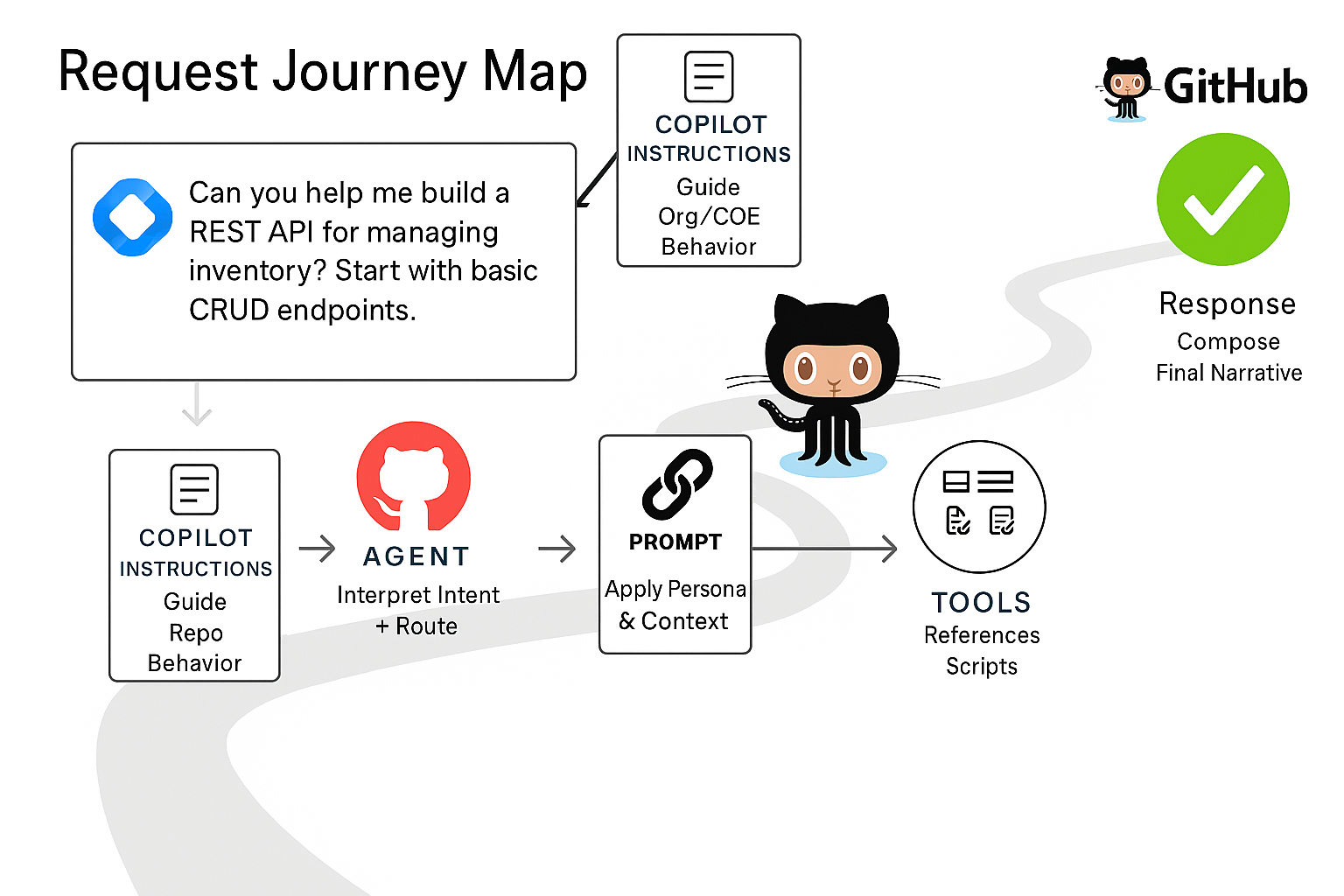
The agentic workflow: Developer provides context and constraints → Agent orchestrates skills → Iterative refinement produces production code.
Learning Path
This lesson covers five key areas. Work through them sequentially or jump to specific topics as needed.
| Topic | What You’ll Learn | Estimated Time |
|---|---|---|
| What is an Agentic Developer? | Mindset shift, agent orchestration | 8 min |
| Context Engineering Best Practices | 5 W’s, layering strategy, techniques | 12 min |
| Decomposition Strategies | Top-down, bottom-up, horizontal slices | 8 min |
| Iterative Refinement Workflow | Generate, review, refine loop | 5 min |
| Guided Example | Motor diagnostics implementation | 12 min |
1. What is an Agentic Developer? (8 min)
The Agentic Mindset
🎯 Copilot Mode: Agent
Key Files:
- src-ODrive/.github/agents/ODrive-Engineer.agent.md - Primary development orchestrator
- src-ODrive/.github/agents/ODrive-QA.agent.md - Testing & DevOps orchestrator
- src-ODrive/.github/skills/ - Specialized skills invoked by agents
Key Concepts
| Traditional Developer | Agentic Developer |
|---|---|
| Writes every line of code manually | Orchestrates AI agents to accomplish goals |
| Tools are passive (syntax highlighting) | Tools are active collaborators with expertise |
| Developer does all the thinking | Developer provides direction, AI implements |
| ”How do I code this?" | "How do I describe this?” |
| Knowledge in your head | Knowledge in steering documents |
Real-World Example: ODrive Motor Controller
💬 Chat Mode Prompt (Traditional Approach):
Developer thinks: "I need to add temperature monitoring to the motor"
→ Manually write thermistor reading code
→ Manually implement calibration
→ Manually add error handling
→ 2-4 hours of coding
🤖 Agent Mode Prompt (Agentic Approach):
ODrive Engineer Add temperature monitoring with NTC thermistor support

Context: #file:src-ODrive/Firmware/MotorControl/motor.hpp
         #file:src-ODrive/Firmware/MotorControl/thermistor.cpp

Requirements:
- Use Steinhart-Hart equation for temperature calculation
- Add thermal shutdown protection at 85°C
- Implement hysteresis to prevent oscillation
- Static allocation only, no exceptions

Acceptance Criteria:
- Compiles without warnings
- Temperature accurate within ±2°C
- Shutdown triggers reliably
Result: 15 minutes with review (vs 2-4 hours manual)
Note: The ODrive Engineer agent will automatically invoke the appropriate skill (e.g.,
odrive-toolchainfor building,cpp-testingfor tests) based on your request.
Custom Agents & Skills in ODrive
We have 6 specialized agents that invoke 9 skills:
| Agent | Role | Primary Skills |
|---|---|---|
| ODrive Engineer | Primary development orchestrator | odrive-toolchain, control-algorithms (🚧), foc-tuning (🚧), sensorless-control (🚧), pcb-review (🚧), signal-integrity (🚧) |
| ODrive QA | Testing & quality assurance | cpp-testing, odrive-toolchain |
| ODrive Ops | CI/CD & release operations | odrive-ops |
| ODrive Reviewer | Code review specialist | N/A (reads and reviews only) |
| ODrive Toolchain | Build & test operations | odrive-toolchain |
| Ada to C++ Migrator | Legacy Ada migration | ada-cpp-migration |
Legend: 🚧 = Planned skill (not yet fully implemented)
Available Skills
| Skill | Status | Capabilities |
|---|---|---|
odrive-toolchain | ✅ | Build firmware, run tests, symbol search, workspace inspection |
odrive-ops | ✅ | CI/CD workflows, releases, GitHub Actions, deployments |
cpp-testing | ✅ | Unit test generation, test planning, code coverage |
ada-cpp-migration | ✅ | Ada to C++ migration patterns and methodology |
control-algorithms | 🚧 | PID controllers, observers, control transformations |
foc-tuning | 🚧 | Automated FOC parameter tuning, bandwidth measurement |
sensorless-control | 🚧 | Sliding mode observers, PLL, back-EMF estimation |
pcb-review | 🚧 | PCB schematic/layout review, design rule checking |
signal-integrity | 🚧 | Impedance calculation, EMI analysis, crosstalk |
Key Point: Agents orchestrate skills. Select the right agent from the dropdown—it routes to the appropriate skill automatically!
2. Context Engineering Best Practices (12 min)
Why Context Matters
🎯 Copilot Modes: Chat + Agent
Files to demonstrate:
- src-ODrive/Firmware/MotorControl/motor.cpp - Motor implementation
- src-ODrive/Firmware/MotorControl/axis.cpp - State machine patterns
AI models have limited context windows. The better you provide context, the better the output.
💬 Chat Mode Prompt (Bad Context - Vague):
"Fix the motor control bug"Result: Generic suggestions, may not match ODrive architecture
🤖 Agent Mode Prompt (Good Context - Specific):
ODrive Engineer The current control loop in foc.cpp is causing
oscillations at 50Hz when running at 3000 RPM.

Task Context: Control algorithm debugging

Context:
#file:src-ODrive/Firmware/MotorControl/foc.cpp
#file:src-ODrive/Firmware/MotorControl/axis.cpp

Details:
- PID controller gains: p_gain=0.5, i_gain=10, d_gain=0.001
- Looking at axis.cpp line 234, the current limiter might be interfering

Requirements:
- Maintain 8kHz control loop rate
- No heap allocation
- Preserve existing error handling

Can you analyze the oscillation source and suggest a fix?
Result: Targeted analysis with architecture-aware recommendations
The 5 W’s of Context Engineering
| Question | Purpose | Example |
|---|---|---|
| WHAT | What are you trying to accomplish? | ”Add overcurrent protection” |
| WHERE | Which files/modules are relevant? | ”#file:motor.cpp, #file:foc.cpp” |
| WHY | What is the business/technical reason? | ”Prevent motor damage from shorts” |
| WHEN | What are timing constraints or conditions? | ”Must work in 8kHz ISR context” |
| WHO | Which agent has the right expertise? | ”ODrive Engineer” or “ODrive QA” |
Context Techniques
🎯 Copilot Modes: Chat + Agent + Inline
Technique 1: File References
💬 Chat Mode Prompt:
Review Firmware/MotorControl/motor.cpp and suggest optimizations for
the current control loop. Focus on reducing CPU cycles in the hot path.
Technique 2: @-mentions
🤖 Agent Mode Prompt:
@workspace Find all uses of thermistor calibration
ODrive Engineer Refactor this into a reusable class following ODrive patterns
Technique 3: Code Selection + Inline Chat
- Select code in editor
- Press
Ctrl+I(Windows) orCmd+I(Mac) - Context is automatically included
- Great for quick fixes and explanations
Technique 4: Multi-file Context
🤖 Agent Mode Prompt:
Looking at these files, refactor the state machine to use a cleaner design pattern:
#file:src-ODrive/Firmware/MotorControl/axis.hpp
#file:src-ODrive/Firmware/MotorControl/motor.cpp
#file:src-ODrive/Firmware/MotorControl/controller.cpp
Technique 5: Error Context
💬 Chat Mode Prompt:
@terminal shows this linker error:
undefined reference to `Motor::apply_pwm_timings'

ODrive Engineer Fix the missing symbol. Check motor.hpp and motor.cpp for declaration/definition mismatch.
Context Layering Strategy
| Layer | Source | Content |
|---|---|---|
| Layer 1 | src-ODrive/.github/copilot-instructions.md | Constitution - coding standards, safety rules (always loaded) |
| Layer 2 | Agent Selection | Orchestrator expertise (ODrive Engineer for dev, ODrive QA for testing) |
| Layer 3 | Specific Files | Exact files and line numbers referenced with src-ODrive/ prefix |
| Layer 4 | Requirements | Constraints like “static allocation only”, “MISRA compliant” |
| Layer 5 | Skills (Auto) | Agent automatically invokes appropriate skill based on task |
Demonstration: Context Engineering with ODrive
🎯 Copilot Mode: Agent
Scenario: Add overcurrent protection to motor driver
💬 Chat Mode Prompt (Poor Context):
"Add overcurrent protection"Result: Generic code, might not match ODrive architecture
🤖 Agent Mode Prompt (Rich Context):
ODrive Engineer Add overcurrent protection to the motor driver.

Context:
#file:src-ODrive/Firmware/MotorControl/motor.cpp
#file:src-ODrive/Firmware/MotorControl/foc.cpp
#file:src-ODrive/Firmware/MotorControl/axis.hpp

Details:
- Current sensing happens in foc.cpp via ADC DMA
- We have phase current measurements: Iu, Iv, Iw
- Motor has DC current limit: motor_.config_.current_lim
- Need to trigger ERROR_CURRENT_LIMIT_VIOLATION
- Must work in interrupt context (control loop at 8kHz)
- Use existing error handling framework from axis.hpp

Requirements:
- Check current magnitude on every PWM cycle
- Use fast sqrt approximation (arm_sqrt_f32)
- Add 10% hysteresis to prevent chattering
- No heap allocation
- MISRA C++ compliant

Acceptance Criteria:
- Compiles without warnings
- Current trip tested at 110% of limit
- Hysteresis prevents rapid on/off cycling
Result: Production-ready code that fits the architecture!
The agent will invoke the
cpp-testingskill to verify the build after implementation.
3. Decomposition Strategies (8 min)
Why Decompose?
🎯 Copilot Modes: Chat + Agent
Complex Task:
"Implement sensorless motor control with observer-based position estimation"Problem: Too broad for AI to handle in one shot
Solution: Break into subtasks using decomposition patterns
Decomposition Patterns
Pattern 1: Top-Down (Architecture First)
🤖 Agent Mode Prompts (Sequential):
Step 1: "ODrive Engineer Design the API for sensorless estimator"
        → Define interfaces and data structures
        → Agent uses control-algorithms skill internally

Step 2: "ODrive Engineer Implement Luenberger observer"
        → Core algorithm implementation

Step 3: "ODrive Engineer Integrate estimator with axis.cpp"
        → Connect to existing control loop

Step 4: "ODrive QA Create integration tests and verify build"
        → Verification and validation via cpp-testing skill
Pattern 2: Bottom-Up (Build Components)
🤖 Agent Mode Prompts (Sequential):
Step 1: "Implement Clarke and Park transforms"
        → Utility functions first

Step 2: "Implement state prediction and correction"
        → Observer state update

Step 3: "Extract position/velocity from observer state"
        → Position estimator

Step 4: "Wire up estimator in motor control loop"
        → Full integration
Pattern 3: Horizontal Slice (End-to-End Feature)
🤖 Agent Mode Prompts (Iterative):
Step 1: "Simple open-loop position estimator (no feedback)"
        → Minimal viable implementation

Step 2: "Add back-EMF based correction"
        → Add feedback loop

Step 3: "Add startup sequence and fault detection"
        → Add robustness

Step 4: "Optimize for real-time performance"
        → Performance tuning
Decomposition Example: ODrive CAN Protocol Extension
🎯 Copilot Mode: Agent
Goal: Add extended CAN message support with 64-bit timestamps
Files to demonstrate:
- src-ODrive/Firmware/communication/can/ - CAN communication
- src-ODrive/tools/create_can_dbc.py - DBC file generator
Decomposition Diagram:
graph TD
    A[CAN Extension] --> B[Protocol Definition]
    A --> C[Firmware Implementation]
    A --> D[Python Tools]
    A --> E[Testing]

    B --> B1[Define message format]
    B --> B2[Update DBC file]

    C --> C1[CAN driver update]
    C --> C2[Timestamp generation]
    C --> C3[Message handlers]

    D --> D1[Python parser]
    D --> D2[ODrive library API]

    E --> E1[Unit tests]
    E --> E2[Integration tests]
🤖 Agent Mode Execution Plan:
1. ODrive Engineer  - Define CAN message format (invokes pcb-review skill for electrical specs)
2. ODrive Engineer  - Implement CAN driver and handlers
3. Regular Copilot   - Update Python tools
4. ODrive QA        - Create comprehensive tests (invokes cpp-testing skill)
When to Decompose
| Decompose If… | Don’t Decompose If… |
|---|---|
| Task takes >30 minutes of manual work | Simple, isolated change |
| Multiple files/modules involved | Well-defined pattern to follow |
| Multiple domains (HW + FW + SW) | Single function or class |
| High complexity or uncertainty | Time to decompose > time to implement |
| You need to think through the design | Clear existing example to follow |
4. Iterative Refinement Workflow (5 min)
The Refinement Loop
🎯 Copilot Modes: Chat + Agent
1. Generate → 2. Review → 3. Refine → 4. Regenerate
     ↑                                        ↓
     └────────────────────────────────────────┘
Files to demonstrate:
- src-ODrive/Firmware/MotorControl/controller.cpp - PID implementation
- src-ODrive/Firmware/MotorControl/encoder.cpp - DMA callback patterns
Example: Refining a Motor Control Function
Iteration 1: Initial Generation
🤖 Agent Mode Prompt:
ODrive Engineer Create a PID controller for velocity control- Result: Basic PID with p, i, d gains
- Review: Missing anti-windup, no derivative filtering
Iteration 2: Add Constraints
💬 Chat Mode Prompt:
Add anti-windup and derivative filter with cutoff frequency- Result: Better, but not handling sample time correctly
- Review: Sample time is hardcoded, should use axis.config_.control_period
Iteration 3: Integrate with System
🤖 Agent Mode Prompt:
Use axis.config_.control_period and match the coding style in:
#file:src-ODrive/Firmware/MotorControl/controller.cpp lines 45-89- Result: Production-ready code that fits the architecture
Refinement Strategies
Strategy 1: Be Specific About What’s Wrong
💬 Chat Mode Prompts:
❌ Bad:  "This isn't quite right"

✅ Good: "The interrupt priority is too low. Should be
         configLIBRARY_MAX_SYSCALL_INTERRUPT_PRIORITY per FreeRTOS rules"
Strategy 2: Reference Working Examples
🤖 Agent Mode Prompt:
Follow the same pattern used in encoder.cpp lines 123-145
for the DMA callback handler:
#file:src-ODrive/Firmware/MotorControl/encoder.cpp
Strategy 3: Provide Constraints Incrementally
First pass:  Get basic functionality
Second pass: Add error handling
Third pass:  Optimize for performance
Fourth pass: Add documentation
Strategy 4: Use /fix for Errors
💬 Chat Mode Prompt:
/fix the linker error for undefined reference to foo()Review Checklist for Embedded Code
Before accepting generated code, verify:
- Memory allocation - Stack only? Size bounds checked?
- Interrupt safety - No blocking calls in ISR?
- Thread safety - Mutexes? Atomic operations?
- Error handling - All paths covered?
- Coding style - Matches project conventions?
- Performance - Tight loop optimizations?
- Hardware constraints - Timing requirements met?
- Safety - Watchdog, bounds checking?
5. Guided Example: Agentic Refactoring (12 min)
This guided example walks through a complete agentic workflow. Follow along to see all the techniques in action.
Exercise: Add Enhanced Diagnostics to ODrive Motor
🎯 Copilot Modes: Chat → Agent
Scenario: You’ve been asked to add comprehensive motor diagnostics that track:
- Motor runtime hours
- Total revolutions
- Average power consumption
- Peak temperature reached
- Fault history (last 10 faults with timestamps)
Files to work with:
- src-ODrive/Firmware/MotorControl/motor.hpp - Motor class definition
- src-ODrive/Firmware/MotorControl/motor.cpp - Motor implementation
- src-ODrive/Firmware/MotorControl/axis.hpp - Error handling patterns
Step-by-Step Guide
Step 1: Context Preparation (2 min)
Open these files to understand the context:
Firmware/MotorControl/motor.hpp  - Motor class definition
Firmware/MotorControl/motor.cpp  - Motor implementation
Firmware/MotorControl/axis.hpp   - Error handling
Step 2: Agent Selection & Initial Prompt (3 min)
Select ODrive Engineer from agent dropdown, then paste:
I need to add comprehensive diagnostics to the Motor class.

Context:
#file:src-ODrive/Firmware/MotorControl/motor.hpp
#file:src-ODrive/Firmware/MotorControl/motor.cpp
#file:src-ODrive/Firmware/MotorControl/axis.hpp

Details:
- The Motor class already tracks basic state in motor_.current_control
- We have access to Iphase_a, Iphase_b, Iphase_c current measurements
- We have access to motor_.fet_thermistor for temperature
- Axis class handles errors via error_ member

Requirements:
- Add diagnostics struct to Motor class:
  - runtime_hours (float)
  - total_revolutions (uint64_t)
  - avg_power_watts (float)
  - peak_temperature_degC (float)
  - fault_history (circular buffer, last 10 faults)
- Update diagnostics in the motor control loop
- Diagnostics must be accessible via USB/CAN
- Use static memory allocation only
- Must work in interrupt context
- Follow ODrive coding standards

Acceptance Criteria:
- Compiles without warnings
- No dynamic allocation (verify with nm/objdump)
- Thread-safe access to diagnostics
- All fields documented with Doxygen

Start by showing me the struct definition for the diagnostics data.
The ODrive-Engineer will orchestrate the implementation and can invoke
cpp-testingto verify the build.
Step 3: Review & Refine (3 min)
💬 Chat Mode Prompts (Follow-up):
"How do we calculate runtime_hours? Should we use a timer or count control cycles?"

"For fault_history, show me the circular buffer implementation"

"Add a reset_diagnostics() method to clear all counters"
Step 4: Implementation Verification (2 min)
Select ODrive QA from agent dropdown, then paste:
Review the motor diagnostics implementation.

Check for:
- Potential race conditions between ISR and main loop
- Interrupt safety (no blocking operations)
- Buffer overflow in fault_history
- Integer overflow in total_revolutions

Suggest unit tests for the diagnostics module.
The QA agent will invoke
cpp-testingskill to run builds and tests.
Step 5: Documentation (2 min)
Select ODrive Engineer from agent dropdown, then paste:
Add comprehensive documentation comments to the
diagnostics struct and methods following Doxygen style.

Include:
- @brief for each member
- @note for thread-safety considerations
- @warning for any limitations
- Usage example in class comment
Success Criteria
By the end of this exercise, you should have:
- ✅ Complete struct definition with proper types
- ✅ Integration points identified in motor control loop
- ✅ Memory safety verified (no dynamic allocation)
- ✅ Interrupt safety confirmed
- ✅ Documentation generated
- ✅ Test approach defined
Key Takeaways
- Start with context - Reference relevant files and constraints
- Choose the right agent - ODrive Engineer for development, ODrive QA for testing
- Be iterative - Get the interface right first, then implementation
- Verify safety - Always check interrupt and thread safety
- Cross-validate - Use ODrive QA to review and run tests
- Agents invoke skills - The orchestrator agents automatically route to specialized skills
Practice Exercises
These exercises help you build agentic development skills. Try them on your own or with the ODrive codebase.
Exercise 1: Agent Selection Practice
Task: For each scenario, identify the best agent and why:
| Scenario | Best Agent | Reason |
|---|---|---|
| Add DMA-based ADC sampling | ODrive Engineer | Firmware/driver development |
| Tune velocity control loop gains | ODrive Engineer | Control algorithm work (add “control focus” to prompt) |
| Generate motor position unit tests | ODrive QA | Testing work (invokes cpp-testing skill) |
| Check CI pipeline status | ODrive QA | DevOps work (invokes odrive-ops skill) |
| Debug race condition in ISR | ODrive Engineer | Low-level firmware debugging |
| Review hardware interface timing | ODrive Engineer | Hardware focus (add constraints in prompt) |
Key Insight: The same agent (ODrive Engineer) handles different domains based on your prompt context. Add phrases like “hardware constraints”, “control theory”, or “firmware implementation” to guide the response.
Exercise 2: Context Engineering Practice
Task: Transform this vague prompt into a rich context prompt.
Vague Prompt: “Make the encoder work better”
Your Solution Template:
ODrive Engineer [Specific problem with encoder]

Context:
#file:src-ODrive/Firmware/MotorControl/encoder.cpp
#file:src-ODrive/Firmware/MotorControl/encoder.hpp

Current Behavior:
- [What's happening now]
- [Symptoms observed]

Desired Behavior:
- [What should happen]
- [Performance targets]

Constraints:
- Static allocation only (no heap)
- Must work in 8kHz interrupt context
- Preserve backwards compatibility

Acceptance Criteria:
- [Measurable success criteria]
- Compiles without warnings
- [Test to verify fix]
Example Rich Prompt:
ODrive Engineer The encoder position has jitter of ±3 counts at standstill.

Context:
#file:src-ODrive/Firmware/MotorControl/encoder.cpp
#file:src-ODrive/Firmware/MotorControl/encoder.hpp

Current Behavior:
- Position oscillates ±3 counts when motor is stationary
- Jitter increases with higher CPR encoders
- Velocity estimate is noisy as a result

Desired Behavior:
- Stable position reading at standstill (±0 counts)
- Clean velocity estimate
- No impact on position accuracy during motion

Constraints:
- Static allocation only
- Must work in 8kHz interrupt context
- Cannot add latency to position reading

Acceptance Criteria:
- Position stable at standstill (verify with scope)
- Velocity noise < 0.1 counts/ms at standstill
- Compiles without warnings
Exercise 3: Task Decomposition Practice
Task: Decompose this complex feature into agent-assignable subtasks.
Complex Task: “Add support for absolute encoder (SSI protocol)”
Decomposition Solution:
| Step | Agent | Subtask | Output |
|---|---|---|---|
| 1 | ODrive Engineer | Design SSI protocol interface and timing requirements | Interface spec, timing diagram |
| 2 | ODrive Engineer | Implement SPI-based SSI bit-banging driver | ssi_encoder.cpp, ssi_encoder.hpp |
| 3 | ODrive Engineer | Integrate SSI encoder with existing encoder abstraction | Updates to encoder.cpp |
| 4 | ODrive QA | Create test plan and hardware test rig config | Test cases, test-rig-ssi.yaml |
Why This Decomposition Works:
- Each step has a clear, focused output
- Steps build on each other sequentially
- Uses the same agent with different task contexts
- QA agent handles testing at the end
Exercise 4: Motor Diagnostics Challenge
Challenge: Add comprehensive diagnostics to the Motor class.
Requirements:
- Track runtime hours (float)
- Track total revolutions (uint64_t)
- Track average power consumption (watts)
- Track peak temperature reached
- Maintain fault history (circular buffer, last 10 faults)
Constraints:
- Static memory allocation only
- Must work in 8kHz interrupt context
- Thread-safe access to diagnostics
- Accessible via USB/CAN protocols
Step-by-Step Approach:
Step 1: Design the data structure
Select ODrive Engineer from agent dropdown, then paste:
Design a diagnostics struct for the Motor class.

Context:
#file:src-ODrive/Firmware/MotorControl/motor.hpp

Requirements:
- Track: runtime_hours, total_revolutions, avg_power_watts, peak_temp, fault_history
- Fault history: circular buffer, last 10 entries with timestamps
- Static allocation only
- Must be thread-safe for ISR access

Show me the struct definition with size calculation.
Step 2: Implement tracking logic
Select ODrive Engineer from agent dropdown, then paste:
Implement runtime tracking in the motor control loop.

Context:
#file:src-ODrive/Firmware/MotorControl/motor.cpp

Details:
- Control loop runs at 8kHz
- Motor is "running" when current > 0.1A
- Count revolutions using encoder position delta

Where should this code go? Show implementation.
Step 3: Verify with QA agent
Select ODrive QA from agent dropdown, then paste:
Review the motor diagnostics implementation for:
1. Race conditions between ISR and main loop
2. Integer overflow in counters
3. Memory safety in circular buffer

Suggest unit tests for the diagnostics module.
Success Criteria:
- ✅ Struct compiles without warnings
- ✅ No dynamic memory allocation
- ✅ Interrupt-safe implementation
- ✅ Circular buffer handles overflow correctly
- ✅ Test approach defined
Quick Reference: Agentic Patterns
Agent & Skill Selection Guide
| Task Type | Agent | Skill Invoked |
|---|---|---|
| Low-level firmware | ODrive Engineer | (direct) + cpp-testing for builds |
| Control algorithms | ODrive Engineer | control-algorithms (🚧), foc-tuning (🚧) |
| Hardware interfaces | ODrive Engineer | pcb-review (🚧), signal-integrity (🚧) |
| Testing & validation | ODrive QA | cpp-testing, cpp-testing (🚧) |
| CI/CD & releases | ODrive QA | odrive-ops |
Legend: 🚧 = Planned skill (not yet implemented)
Context Engineering Checklist
| Element | Example |
|---|---|
| Agent selection | ODrive Engineer or ODrive QA |
| File references | #file:src-ODrive/Firmware/MotorControl/motor.cpp |
| Problem description | ”Current oscillation at 50Hz” |
| Technical details | ”PID gains: p=0.5, i=10, d=0.001” |
| Constraints | ”Static allocation only, 8kHz ISR” |
| Acceptance criteria | ”Compiles without warnings” |
Decomposition Decision Tree
Is the task complex? (>30 min manual work)
├── YES → Decompose
│   ├── Development work? → ODrive Engineer (routes to skills)
│   ├── Testing/CI work? → ODrive QA (routes to qa/devops skills)
│   └── Multiple files? → Break by module, iterate
└── NO → Execute directly with appropriate agent
Refinement Strategies
| Strategy | When to Use |
|---|---|
| Be specific about errors | Code compiles but wrong behavior |
| Reference working examples | Need to match existing patterns |
| Add constraints incrementally | Basic version works, need hardening |
| Use /fix for compiler errors | Quick syntax/type fixes |
Troubleshooting
| Issue | Solution |
|---|---|
| Agent not responding to domain questions | Verify agent file exists in src-ODrive/.github/agents/ |
| Context seems ignored | Check file paths are correct, use #file: syntax with src-ODrive/ prefix |
| Output doesn’t match coding style | Add reference to existing code: “match style in motor.cpp lines 45-89” |
| Agent makes heap allocations | Add explicit constraint: “static allocation only, no new/malloc” |
| Generated code has race conditions | Add: “must be thread-safe, consider ISR context” |
| Too much output to review | Decompose into smaller subtasks |
| Agent suggests wrong patterns | Reference specific ODrive patterns to follow |
| Refinement loop not converging | Start over with more specific initial prompt |
| Skill not invoked | The agent decides when to invoke skills - be explicit about needing builds/tests |
Debug Tips
-
Agent selection issues:
- Check agents dropdown for available agents (ODrive Engineer, ODrive QA)
- Verify
.agent.mdfile format is correct - Look at agent source in
src-ODrive/.github/agents/
-
Context not being used:
- Ensure
#file:paths includesrc-ODrive/prefix - Verify files exist at specified paths
- Check for typos in file names
- Ensure
-
Poor output quality:
- Add more Layer 4 constraints
- Reference specific code examples
- Break task into smaller pieces
-
Skills not working:
- Check
src-ODrive/.github/skills/for available skills - Some skills are planned (🚧) and not yet implemented
- Check
Additional Resources
Prompt Templates
Here are ready-to-use prompt templates for common embedded development tasks:
Template 1: Add New Feature
Select ODrive Engineer from agent dropdown, then paste:
Add [feature name] to [module name].

Context:
#file:src-ODrive/Firmware/[path/to/file.cpp]
#file:src-ODrive/Firmware/[path/to/header.hpp]

Details:
- [Current state of the system]
- [Related components and their interfaces]
- [Any existing patterns to follow]

Requirements:
- [Constraint 1: e.g., static allocation only]
- [Constraint 2: e.g., must work in ISR context]
- [Constraint 3: e.g., MISRA compliant]

Acceptance Criteria:
- [Criterion 1: e.g., compiles without warnings]
- [Criterion 2: e.g., specific behavior verified]
Template 2: Debug Issue
Select ODrive Engineer from agent dropdown, then paste:
Debug [symptom] in [module].

Context:
#file:src-ODrive/Firmware/[path/to/file.cpp]

Observed Behavior:
- [What's happening]
- [When it happens]
- [How to reproduce]

Expected Behavior:
- [What should happen]

Constraints:
- [Timing requirements]
- [Memory constraints]

Analyze the root cause and suggest a fix.
Template 3: Generate Tests
Select ODrive QA from agent dropdown, then paste:
Create test plan for [feature/module].

Context:
#file:src-ODrive/Firmware/[path/to/implementation.cpp]

Feature Description:
- [What the feature does]
- [Key behaviors to verify]

Test Coverage Needed:
1. [Happy path scenarios]
2. [Error conditions]
3. [Edge cases]
4. [Performance requirements]

Provide test cases with acceptance criteria.
Reference Files
src-ODrive/Firmware/MotorControl/motor.hpp- Motor class structuresrc-ODrive/Firmware/MotorControl/axis.hpp- Error handling patternssrc-ODrive/.github/agents/ODrive-Engineer.agent.md- Primary development agentsrc-ODrive/.github/agents/ODrive-QA.agent.md- Testing & DevOps agentsrc-ODrive/.github/skills/- Available skills directorysrc-ODrive/.github/README.md- Full agent system documentation
Practice Scenarios
Try these scenarios to build your agentic development skills:
- Motor Diagnostics - Add telemetry tracking (runtime hours, fault history)
- Safety Watchdog - Implement fault detection for overcurrent, overtemp, encoder errors
- Configuration Manager - Create validated config system with NVM persistence
- CAN Protocol Extension - Add 64-bit timestamps to CAN messages
Official Documentation
Frequently Asked Questions
When should I use ODrive Engineer vs ODrive QA?
| Use ODrive Engineer for: | Use ODrive QA for: |
|---|---|
| Writing firmware code | Running builds and tests |
| Implementing control algorithms | Generating test plans |
| Debugging hardware interfaces | Reviewing code for issues |
| Designing data structures | CI/CD and deployment tasks |
| Refactoring existing code | Performance validation |
Rule of thumb: Development work → ODrive Engineer. Verification work → ODrive QA.
How do I know if I’ve provided enough context?
Your prompt has enough context when it includes:
- ✅ Specific file references (
#file:src-ODrive/Firmware/...) - ✅ Clear problem statement (what, not how)
- ✅ Technical constraints (memory, timing, standards)
- ✅ Acceptance criteria (how to verify success)
- ✅ Examples of patterns to follow (if applicable)
Signs of insufficient context: Generic output, wrong patterns, doesn’t compile, ignores constraints.
What if the generated code doesn’t compile?
- Use
/fix- Paste the error and ask Copilot to fix it - Add more context - Reference the file with the error
- Ask ODrive QA - It can invoke build skills to diagnose
- Check constraints - You may have conflicting requirements
Can agents modify multiple files at once?
Yes! Agents in “Agent Mode” can:
- Edit multiple files in a single operation
- Create new files
- Run terminal commands
- Invoke skills for builds and tests
Tip: For large refactoring, decompose into smaller tasks and iterate.
What’s the difference between agents and skills?
| Agents | Skills |
|---|---|
| Orchestrators - Direct the conversation | Capabilities - Specific actions |
| You select them (ODrive Engineer) | Agents invoke them automatically |
Defined in .github/agents/ | Defined in .github/skills/ |
| 2 in ODrive system | Multiple per agent |
Example: When you ask ODrive QA to run tests, it automatically invokes the cpp-testing skill.
Which skills are implemented vs planned?
Implemented (✅):
cpp-testing- Build firmware, run tests, symbol searchodrive-ops- CI/CD workflows, releases, GitHub Actions
Planned (🚧):
control-algorithms- PID, observers, control theoryfoc-tuning- FOC parameter tuningsensorless-control- Back-EMF estimation, PLLpcb-review- Schematic/layout reviewsignal-integrity- EMI analysis, impedance
How do I handle complex refactoring across many files?
- Decompose - Break into file-by-file or module-by-module tasks
- Define interfaces first - Get the API right before implementation
- Iterate - Small changes, frequent verification
- Use Agent Mode - It handles multi-file edits better than Chat
- Verify with ODrive QA - Run builds after each major change
Can I use this approach without custom agents?
Yes! The techniques work with regular Copilot too:
- Context engineering applies to all prompts
- Decomposition helps any complex task
- Iterative refinement improves any output
Custom agents add domain expertise and consistency, but aren’t required.
Summary: Key Takeaways
- You are the architect - Direct agents, don’t write every line
- Context is currency - Better context = better output
- The 5 W’s - What, Where, Why, When, Who for every prompt
- Decompose complexity - Break big tasks into agent-sized pieces
- Iterate to quality - First output is rarely perfect
- Two agents, many skills - ODrive Engineer (dev) + ODrive QA (test)
- Skills are automatic - Agents invoke them based on your request
- Always verify - Check safety, memory, interrupts for embedded code
GitHub Copilot Agentic Development & Context Engineering Guide
Last Updated: January 2026